閒聊
之前在辦活動的時候,得知有朋友在 follow 我的 Blog ,真是讓我非常訝異,因為我一直是默默撰寫文章,而且雖然我有參與 Golang 和 GDG 社群,但是我寫的內容很常都跟 Golang 和 Google 技術沒什麼太大關係 XD 非常感謝各位的觀看,之前有近兩個月都沒更新,感覺有點罪惡,以後會盡量定期更新的。
目前除了自修 CSE 506 課程之外,還有學習 RISC-V instruction 以及 pipeline,因為過往經驗都是看 x86_64 instruction 居多,現在改看 RISC-V 還蠻不習慣的。另外就是還想學用 Rust 寫 kernel module,目前趨勢是有些 Kernel developers 嘗試將 Rust code 結合進 Linux kernel 中,再加上 Rust 的發展也蠻成熟,是時候抽空來學習一下。
Lab 3 Exercise Part A - User Environments
Lab 3 是我認為蠻重要的一個實驗課程,主要學習 process 的 context 組成、context switch 流程,以及 interupt handlers 的註冊和運作過程。當然,JOS 中簡化了很多步驟,不過透過學習這些概念,再回去看 Linux kernel code 就會有更深的感觸。
而為了區別與 UNIX processes 的差異,在 JOS 中是使用 ENV(environment) 來代表 JOS 的 process 功能, JOS environment 也有 thread 和 address space,在實驗中我們會去實作這兩個概念。
User Environments
JOS 透過三個變數來管理 environments:
1
2
3
| struct Env *envs = NULL; /* All environments */
struct Env *curenv = NULL; /* the current env */
static struct Env *env_free_list; /* Free environment list */
|
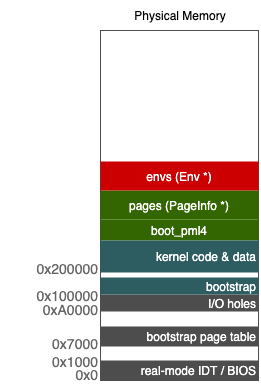
其中 envs 為 array 結構,在 kernel 初始化時就會分配 1024 個 Env 記憶體空間大小。curenv 就是目前正在使用的 Env,而我們透過 free list 來取得目前可供使用的 Env。因此,我們重新檢視目前的記憶體佔用狀況,其中有一區塊必須用來紀錄所有 Env 狀態。
接著,來觀察 Env 結構:
 1
 2
 3
 4
 5
 6
 7
 8
 9
10
11
12
13
14
15
| struct Env {
struct Trapframe env_tf; // Saved registers
struct Env *env_link; // Free list link pointers
envid_t env_id; // Unique environment identifier
envid_t env_parent_id; // env_id of this env's parent
enum EnvType env_type; // Indicates special system environments
unsigned env_status; // Status of the environment
uint32_t env_runs; // Number of times environment has run
// Address space
pml4e_t *env_pml4e; // Kernel virtual address of top-level page dir,
// or root of extended page tables in guest mode.
physaddr_t env_cr3;
uint8_t *elf;
};
|
回顧作業系統的課程中所提到的觀念:
- 切換 process 的時候,會需要保存目前狀態,而
struct Trapframe env_tf 就是用來儲存 registers 的數值 - 從 interrupt handler 回到指定的 process,依賴
env_id - fork process 時候會有 parent ID,則是
env_parent_id env_status 紀錄當前 process 狀態,例如 running or runnable- 每個 process 有自己的 address space,則是紀錄在
env_pml4e 和 env_cr3
Create an envs array
有了概念之後,就先從 envs 實作起。首先分配 size 為 sizeof(struct Env) * NENV 的記憶體空間,接著把該記憶體區段 mapping 到指定的 virtual address UENVS,其權限為 kernel read, user read。(相關 functions 實作可參考 CSE 506 Lab2 - Memory Management and Virtual Memory Mapping)
1
2
3
4
| uint32_t env_size = sizeof(struct Env) * NENV;
envs = boot_alloc(env_size);
boot_map_region(boot_pml4e, UENVS, env_size, PADDR(env), PTE_U);
|
初始化 env,並且組成 env free list 供後續使用。
 1
 2
 3
 4
 5
 6
 7
 8
 9
10
11
12
13
14
15
| void
env_init(void)
{
struct Env *last;
last = env_free_list = &envs[0];
envs[0].env_id = 0;
for (int i = 1; i < NENV; i++) {
envs[i].env_id = 0;
last->env_link = &envs[i];
last = &envs[i];
}
// Per-CPU part of the initialization
env_init_percpu();
}
|
Segment Register
觀察 env_init_percpu(); ,留意 segment register 的設定,在 Developer’s Manual: 3.4.2 Segment Selectors 中提到,segment register 紀錄 segment selector 的值,而 segment selector 前 2 個 bit 的值為 Requested Privilege Level ,因此 (GD_UD|3) 意味著 user level(applications)。其他 Level 可以參考 Developer’s Manual: 4.5 PRIVILEGE LEVELS。
1
2
| asm volatile("movw %%ax,%%gs" :: "a" (GD_UD|3));
asm volatile("movw %%ax,%%fs" :: "a" (GD_UD|3));
|
Setup an address space for env
每個 env 會有自己獨立的 address space,而在 JOS 中是透過建立不同 pml4 page table 來達成目的。
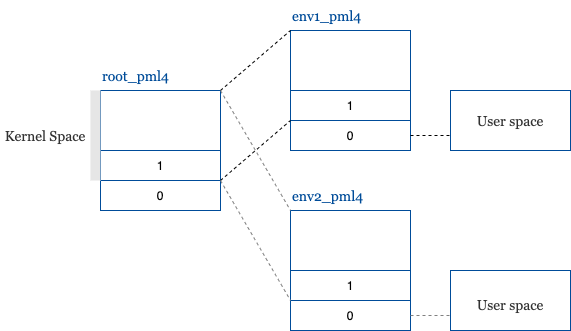
其中要注意的地方是,env 的 pml4[0] 被設定為 user address space,而 pml4[1] - pml4[511] 則是 kernel address space,因此每個 env 的 pml4 1 - 511 entry 都會對應到相同的 kernel page table (boot_pml4),他們才能取得相同的資訊。而 pml4[0] 則是每個 env 都有自己的一個 table,並對應到不同的 physical memory address。
 1
 2
 3
 4
 5
 6
 7
 8
 9
10
11
12
13
14
15
16
17
18
19
20
21
22
23
24
| static int env_setup_vm(struct Env *e)
{
int i;
struct PageInfo *p = NULL;
// Allocate a page for the page directory
if (!(p = page_alloc(ALLOC_ZERO)))
return -E_NO_MEM;
p->pp_ref++;
e->env_pml4e = page2kva(p); // entry should be a virtual address
e->env_cr3 = page2pa(p);
// NPMLENTRIES: the num of pml4 entries
for (i = PML4(UTOP); i < NPMLENTRIES; i++)
e->env_pml4e[i] = boot_pml4e[i];
// UVPT maps the env's own page table read-only.
// Permissions: kernel R, user R
e->env_pml4e[PML4(UVPT)] = e->env_cr3 | PTE_P | PTE_U;
return 0;
}
|
Env page allocate helper
為了方便我們分配 physical address 到指定的 virtual address,我們實作一個 helper: region_alloc 來達成目的。
 1
 2
 3
 4
 5
 6
 7
 8
 9
10
11
12
13
14
15
16
17
18
| static void
region_alloc(struct Env *e, void *va, size_t len)
{
void *start = ROUNDDOWN(va, PGSIZE);
void *end = ROUNDUP(va + len, PGSIZE);
for(; start < end; start += PGSIZE) {
struct PageInfo *pp = page_alloc(0);
if (pp) {
pp->pp_ref++;
int ret = page_insert(e->env_pml4e, pp, start, PTE_W | PTE_U);
if (ret < 0) {
panic("region_alloc: %e \n", ret);
}
} else {
panic("region_alloc: failed to allocate a page \n");
}
}
}
|
Read a program content for user mode
因為目前 Lab 3 階段的 JOS 還沒有 file system 支援,所以是藉由切換到 user mode 後,直接執行指定 program 的方式來驗證其正確性。而為了實現此驗證方式,我們需要讀取 JOS 已經事先準備好的 program ELF ,接著把 ELF 內的相關資訊放入 Env env_tf。
在實作之前,要先了解如何讀取 program header 內容,以取得 program segment。
Program header
The program header table tells the system how to create a process image.
參考 Executable and Linkable Format,找到需要資料的對應位置,其中包含:
e_phoff - Program header table 位置e_phnum - Program header table 的 entry 數量program_header->p_memsz - segment 在 memory 佔用的大小program_header->p_va - virtual address of segmentprogram_header->p_offset - segment 在 file image 的位置program_header->p_filesz - segment 在 file system 佔用的大小
The difference between p_memsz and p_filesz
For the PT_LOAD entry describing the data segment, the p_memsz may be greater than the p_filesz. The difference is the size of the .bss section which is not required to be stored on disk.
根據 program header 的資訊,我們就可以來實作 Lab 3 的 load_icode。主要流程:
- 從 ELF 中取得 program segment 數量
- 根據每個 segment 所需空間來分配適當的記憶體
- 把 segment 內容從 file image 複製到指定的 memory address (program_header->p_va)
- 建立 stack 記憶體空間供 user program 使用
- 將 Env 的 RIP(instruction pointer) 指向 ELF entry
這邊有個地方要特別注意,就是在執行複製的時候,需要將當前 pml4 page table 切換成 Env 的 pml4 page table,原因是我們使用 region_alloc 來為指定的 Env pml4 分配 program_header->p_va 的 page,不過當前的執行環境卻是使用 boot_pml4 table,如果我們不切換成 Env pml4 的話,那麼在 memmove 和 memset 階段就會出錯,因為找不到 program_header->p_va 配置。
e_entry
The virtual address to which the system first transfers control, thus starting the process.
 1
 2
 3
 4
 5
 6
 7
 8
 9
10
11
12
13
14
15
16
17
18
19
20
21
22
23
24
25
| void load_icode(struct Env *e, uint8_t *binary)
{
e->elf = binary;
struct Proghdr *program_header, *end_program_header;
struct Elf *elf = (struct Elf *) binary;
program_header = (struct Proghdr *) (binary + elf->e_phoff);
end_program_header = program_header + elf->e_phnum;
lcr3(e->env_cr3); // Important!
for (; program_header < end_program_header; program_header++) {
if (program_header->p_type == ELF_PROG_LOAD) {
region_alloc(e, (void *) program_header->p_va, program_header->p_memsz);
memmove((void *) program_header->p_va, (void *)binary + program_header->p_offset, program_header->p_filesz);
memset((void *)program_header->p_va + program_header->p_filesz, 0, program_header->p_memsz - program_header->p_filesz);
}
}
lcr3(boot_cr3);
region_alloc(e, (void *)(USTACKTOP - PGSIZE), PGSIZE); // the stack for user space
e->env_tf.tf_rip = elf->e_entry;
}
|
Create an env and run it
最後步驟是新建一個 Env,並且實作 kernel mode Env 切換 到 user mode Env 的流程。
 1
 2
 3
 4
 5
 6
 7
 8
 9
10
| void env_create(uint8_t *binary, enum EnvType type)
{
struct Env *env;
int ret = env_alloc(&env, 0);
if (ret < 0) {
panic("env_alloc: %e", ret);
}
load_icode(env, binary);
env->env_type = type;
}
|
而 JOS Env 共定義了五種狀態:
1
2
3
4
5
6
7
| enum {
ENV_FREE = 0,
ENV_DYING,
ENV_RUNNABLE,
ENV_RUNNING,
ENV_NOT_RUNNABLE
};
|
因此在執行 Env 切換流程時,要確認並且調整 Env 狀態。
 1
 2
 3
 4
 5
 6
 7
 8
 9
10
11
12
13
14
15
| void env_run(struct Env *e)
{
if (e->env_status != ENV_RUNNABLE)
panic("the env could not run");
if (curenv && curenv->env_status == ENV_RUNNING)
curenv->env_status = ENV_RUNNABLE;
curenv = e;
curenv->env_status = ENV_RUNNING;
curenv->env_runs++;
lcr3(curenv->env_cr3);
env_pop_tf(&(curenv->env_tf));
}
|
切換 JOS Env 有兩個重要的條件:
- 改變 address space
- 復原 register 數值
其中,改變 address space 是使用 lcr3,env_pop_tf 則是負責將儲存在 Env 的 register 數值放回到 register。我們觀察一下 env_pop_tf 的行為:
 1
 2
 3
 4
 5
 6
 7
 8
 9
10
11
12
| void env_pop_tf(struct Trapframe *tf)
{
__asm __volatile("movq %0,%%rsp\n"
POPA // pop saved registers
"movw (%%rsp),%%es\n"
"movw 8(%%rsp),%%ds\n"
"addq $16,%%rsp\n"
"\taddq $16,%%rsp\n" /* skip tf_trapno and tf_errcode */
"\tiretq"
: : "g" (tf) : "memory");
panic("iret failed"); /* mostly to placate the compiler */
}
|
搭配 struct Trapframe format:
 1
 2
 3
 4
 5
 6
 7
 8
 9
10
11
12
13
14
15
16
17
18
19
20
21
22
| struct Trapframe {
struct PushRegs tf_regs;
uint16_t tf_es;
uint16_t tf_padding1;
uint32_t tf_padding2;
uint16_t tf_ds;
uint16_t tf_padding3;
uint32_t tf_padding4;
uint64_t tf_trapno;
/* below here defined by x86 hardware */
uint64_t tf_err;
uintptr_t tf_rip;
uint16_t tf_cs;
uint16_t tf_padding5;
uint32_t tf_padding6;
uint64_t tf_eflags;
/* below here only when crossing rings, such as from user to kernel */
uintptr_t tf_rsp;
uint16_t tf_ss;
uint16_t tf_padding7;
uint32_t tf_padding8;
} __attribute__((packed));
|
其中 POPA 是將 struct PushRegs 儲存的 register 數值放回到 register,接著 movw 與 addq 的行為其實是把 stack pointer 調整到 tf->tf_rip 位置,最後使用 iretq instruction,讓指定的 instruction pointer (tf_rip) 可以被執行。
Recap
重新複習上述我們所完成的 Lab 內容:
- 在 kernel mode 新建立一個 env (process)
- 設置 env 的 address space (pml4 table)
- 根據 ELF Program header 資訊配置 env,包含 program entry point
- 切換成 env 的 address space 並還原 env 的 registers 值
- 跳轉去適當的 instruction 位置 (iret)
References
- x86 Segmentation for the 15-410 Student
- Executable and Linkable Format
- IA-32 Developer’s Manual
- Getting to Ring 3
- GCC-Inline-Assembly-HOWTO