CSE 506 Lab2 - Memory Management and Virtual Memory Mapping

Operating System

閒聊

上次寫完 Lab 2 source code study 之後,一晃眼就過了近兩個月。中間被各種事物攔截,加上剛好有些機遇和機會,因此挪了一些時間去準備,等事情有比較明朗後再跟大家分享。此外,學校也開學了,這學期修了偏硬體架構的課程,包含 RISC-V 和架構效能分析等,單智君教授的教學內容很好,聲音也很溫柔,非常喜歡這位教授的課程。

這時間還遇上 Macbook 螢幕完全無法顯示的意外,經由朋友提醒,2016 年產的 13 吋 Macbook Pro 有螢幕背光災情,Apple 有提供免費召回維修的服務,因此花了一些時間送修。而 Apple 的服務也還不錯,整個螢幕換新,看來又可以撐好一陣子了 <3

Lab 2

實驗說明文件

Part 1: Physical Page Management

Part 1 是實作 physical memory allocator。在 CSE 506 Lab2 - E820 Memory Map & Page Translation (1) 可以看到系統在執行 kernel code 前,有先在 bootstrap 階段建立 page translation 所需的 pml4 table,以確保 kernel code 可以正確地被執行,不過在 kernel code 運行階段,我們需要建立新的 pml4 table ,來讓我們可以有更多控制權。

boot_alloc

Page translation 機制最重要的就是先有 pml4 table,我們透過實作 boot_alloc 來分配 pml4 table 的記憶體空間。而在實作之前,第一個問題就是:alloc 的初始記憶體位置在哪裡?

而在 boot_alloc code 中可以看到:

1
2
3
4
if (!nextfree) {
    extern char end[];
    nextfree = ROUNDUP((char *) end, PGSIZE);
}

end 這個 variable 是在其他地方定義,這也告訴我們只要取得 end address,就可以知道我們該從哪個記憶體位置開始執行 allocation。end variable 定義在 link script:

1
2
3
4
.bss : {
		*(EXCLUDE_FILE(vmm/guest/obj/kern/bootstrap.o) .bss)
	}
PROVIDE(end = .);

緊接在 .bss section 下方,這也意味著記憶體位置是在 .bss section 結束之後,以確保 kernel text 和 data 這些記憶體位置不會 overlap。

The PROVIDE keyword may be used to define a symbol, such as etext, only if it is referenced but not defined. The syntax is PROVIDE(symbol = expression).

有了這些資訊就可以來實作 boot_alloc function 。

 1
 2
 3
 4
 5
 6
 7
 8
 9
10
11
12
13
14
15
16
17
18
19
20
21
22
23
static void *boot_alloc(uint32_t n)
{
    static char *nextfree;
    char *result;
    if (!nextfree) {
        extern char end[];
        nextfree = ROUNDUP((char *) end, PGSIZE);
    }

    result = nextfree;

    if (!n)
        return result;

    nextfree = ROUNDUP(nextfree + n, PGSIZE);

    // npages: the number of physical pages available
    // in both base and extended memory
    if (npages * PGSIZE < PADDR(nextfree))
        panic("boot_alloc: out of memory\n");

    return result;
}

page_init

接著,我們透過 struct PageInfo *pages 來追蹤 page 的使用狀況,將 physical memory 切割成 PGSIZE 的陣列,並用 struct PageInfo 紀錄當前 reference 次數。同時,struct PageInfo 是 list 結構,所以也用於 free page list ,這樣可以讓我們快速地找到哪些 page 是可以使用的。

1
2
3
4
struct PageInfo {
	struct PageInfo *pp_link;
	uint16_t pp_ref;
};

在使用 page_alloc 之前,先使用 page_init 來初始化 pageInfo list。而初始化最重要的事情就是標記已被使用的 page,例如 kernel code、I/O、BIOS 等。

根據題目,我們使用圖示來看目前用到的記憶體區塊:
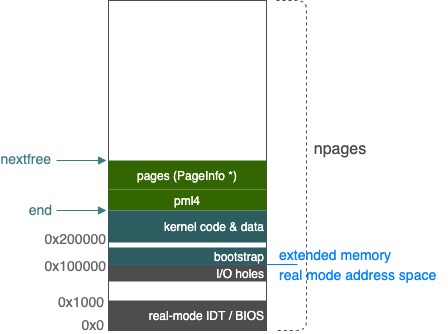
memory area

其中,已被佔用的記憶體包含:

  1. BIOS data (0x0 ~ 0x1000)
  2. Bootstrap page table (0x7000 ~ 0xC000) 這是我們目前正在使用的 page table,所以要設為佔用。
  3. I/O holes (0xA0000 ~ 0x100000)
  4. bootstrap code and kernel code (0x100000 ~ end pointer)

因此,我們要將對應的 page 標示已使用,並把可供使用的 page 加入到 free list 中。

 1
 2
 3
 4
 5
 6
 7
 8
 9
10
11
12
13
14
15
16
17
18
19
20
21
22
23
24
25
26
27
28
29
30
31
32
33
34
35
36
37
38
39
void page_init(void)
{
    size_t i;
    struct PageInfo* last = NULL;

    uint64_t io_page = IOPHYSMEM / PGSIZE;
    uint64_t free_page = PADDR(boot_alloc(0)) / PGSIZE;

    pages[0].pp_ref = 1;
    pages[0].pp_link = NULL;

    for (i = 1; i < npages; i++) {
        uint64_t va;
        bool used = false;
        
        pages[i].pp_link = NULL;

        if (i >= io_page && i < free_page)
            used = true;

        va = KERNBASE + i * PGSIZE;

        if (va >= BOOT_PAGE_TABLE_START && va < BOOT_PAGE_TABLE_END)
            used = true;

        if (used) {
            pages[i].pp_ref = 1;
            continue;
        }
        
        pages[i].pp_ref = 0;
        
        if(last)
            last->pp_link = &pages[i];
        else
            page_free_list = &pages[i];
        last = &pages[i];
    }
}

由於不知道 bootstrap code 的結束位置,因此把從 I/O 到 kernel code end 這段區域都標示成已使用。

page_alloc & page_free

而有了 page free list,要處理 page allocation 和 page free 都簡單很多,只要將 page 從 free list 中取出和放回即可。

 1
 2
 3
 4
 5
 6
 7
 8
 9
10
11
12
13
14
15
16
17
18
19
20
21
22
23
24
struct PageInfo *page_alloc(int alloc_flags)
{
	if (!page_free_list)
		return NULL;

	struct PageInfo *page = page_free_list;
	page_free_list = page->pp_link;

	if (alloc_flags & ALLOC_ZERO)
		memset(page2kva(page), '\0', PGSIZE);

	page->pp_link = NULL;

	return page;
}

void page_free(struct PageInfo *pp)
{
	if (pp->pp_ref != 0 || pp->pp_link)
		panic("'the page could not be freed");

	pp->pp_link = page_free_list;
	page_free_list = pp;
}

Part 2: Virtual Memory

有了初始的 pml4 table 後,接下來就是對照 AMD64 Architecture Programmer’s Reference Manual virtual address 與 physical addresses 轉換機制,建立起 pysical pages 與 virtual memory 之間的關係。

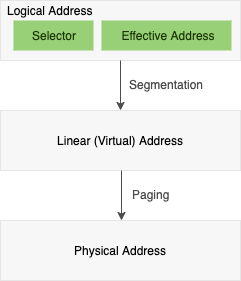
在 x86_64 架構中,定義了四種形態的 address:

  1. Logical addresses
  2. Effective addresses
  3. Linear (virtual) addresses
  4. Physical addresses

其對應關係為:

memory area

早先的 x86 架構多採用 segmentation translation 機制,不過由於 page translation 機制能更有助於系統軟體處理 process isolation 和 relocation 等議題,因此在當前的 x86_64 long mode 中,是以 flat 64-bit virtual-address(segmentation disabled) 實現 page translation。
bootstrap.S file 中可以看到 GDT(Global descriptor table) 相關設定,其中透過將 code / data segment 的 base address 設為 0 來停用 segmentation。

1
2
3
4
5
gdt_64:
    SEG_NULL
    // 0af9a - flag, 000000 - segment's base addr, ffff - limit
    .quad  0x00af9a000000ffff            #64 bit CS
    .quad  0x00cf92000000ffff            #64 bit DS

:::

首先,我們需要能查找各 level page table 的 function,以利我們能依據 virtual address 一層一層地找到對應的 page table entry,其中包含:

1
2
3
pte_t * pml4e_walk(pml4e_t *pml4e, const void *va, int create);
pte_t * pdpe_walk(pdpe_t *pdpe,const void *va,int create);
pte_t * pgdir_walk(pde_t *pgdir, const void *va, int create);

預期的查找行為:pml4e_walk (Level 4) -> pdpe_walk (Level 3) -> pgdir_walk (Level 2) -> 回傳 page table enrty (Level 1)。

根據上述內容,實作一部分的 code:

 1
 2
 3
 4
 5
 6
 7
 8
 9
10
11
12
pte_t *pml4e_walk(pml4e_t *pml4e, const void *va, int create)
{
	pdpe_t *pdpe;
	struct PageInfo *page = NULL;
	pml4e_t *current_pml4e = &pml4e[PML4(va)];

    // KADDR: a macro takes a physical address and returns the corresponding kernel virtual address.
	pdpe = (pdpe_t *) KADDR(PTE_ADDR(*current_pml4e));

	return pdpe_walk(pdpe, va, create);

}

此外,在查找 table entry 過程中,當我們發現此 entry 為 NULL 時,就要幫它分配新的 physical page,分配完後繼續查找下一層 table。如此一來,就會需要我們在 Part 1 所實作的 page_alloc 和 page_free。

 1
 2
 3
 4
 5
 6
 7
 8
 9
10
11
12
13
14
15
16
17
18
19
20
21
22
23
24
25
26
27
28
29
30
pte_t *pml4e_walk(pml4e_t *pml4e, const void *va, int create)
{
	pdpe_t *pdpe;
	struct PageInfo *page = NULL;
	pml4e_t *current_pml4e = &pml4e[PML4(va)];
	
	if(create && !*current_pml4e) {
		page = page_alloc(ALLOC_ZERO);
		if (!page)
			return NULL;

		page->pp_ref++;
        
        // permissions: PTE_P | PTE_W | PTE_U
		*current_pml4e = (pml4e_t) (page2pa(page) & ~0xFFF) | PTE_P | PTE_W | PTE_U;
	}

	pdpe = (pdpe_t *) KADDR(PTE_ADDR(*current_pml4e));

	pte_t *pte = pdpe_walk(pdpe, va, create);

	if (!pte && page) {
        // decrease the ref count and free the page if ref count is 0.
		page_decref(page);
        // clear the entry
		*current_pml4e = 0x0;
	}

	return pte;
}

page = page_alloc(ALLOC_ZERO);,取得目前可以使用的 physical PageInfo 之後,再透過 page2pa 找出 PageInfo 所對應的 physical memory address。

接著,我們根據 pml4 table enrty 來找到 Level 3 page directory pointer table。 pdpe = (pdpe_t *) KADDR(PTE_ADDR(*current_pml4e));,pml4 table entry 儲存的是 physical address | flags,因此我們需要使用 PTE_ADDR 來移除到 flags,KADDR 將 physical address 轉換成 virtual address。

這邊要注意的地方是 physical address 與 virtual virtual address 的使用。由於我們將 pdpe 參數傳遞給下一個 function pdpe_walk(pdpe, va, create);,因此 pdpe (physical address) 需要再轉換成 virtual address 好讓 address 能在程式運行中時正確被解讀。

實作好 pml4e_walk 之後,後續的 pdpe_walk、pgdir_walk 基本上大同小異,只要參照 virtual address translation 圖表 正確地從 virtual address 取出 entry offset 即可。

Part 3: Kernel Address Space

最後,實作 boot_map_region 將指定的 virtual address 和 physical address 關聯起來。

 1
 2
 3
 4
 5
 6
 7
 8
 9
10
void boot_map_region(pml4e_t *pml4e, uintptr_t la, size_t size, physaddr_t pa, int perm)
{
	pte_t *pte;
	for(int i = 0; i < size; i += PGSIZE) {
		pte = pml4e_walk(pml4e, (void *)la + i, true);
		if (!pte)
			panic("failed to find the physical memory");
		*pte = (pa + i) | perm | PTE_P;
	}
}

舉例來說,我們要將 pages 的 physical address 對應到 UPAGES virtual address 上,並且給予 user read-only 權限。

1
boot_map_region(pml4e, UPAGES, page_size, PADDR(pages), PTE_U);

mapping 所有的 physical address 到指定的 virtual address,只允許 kernel 使用。

1
boot_map_region(pml4e, KERNBASE, npages * PGSIZE, (physaddr_t)0x0, PTE_W);

PTE_UPTE_W 表示 permission,以用來區別 user 被允許讀寫的記憶體區域。當然還有其他 permission bit 表示,可以參閱 AMD64 Architecture Programmer’s Reference Manual 的 5.4.1 節。

Recap

  1. x86_64 架構使用 4 層 page table 來實作 page translation,透過解析 virtual address 可以取得各層級 table 的 entry offset。
  2. 注意 physical address 和 virtual address 的使用時機,配置 page table 時是使用 physical address。
  3. PageInfo 用來表示 physical memory page 的使用狀況,透過 PageInfo 可以取得對應的 physical address 並且再轉換到 virtual address,要清楚這之間的關係。
  4. 了解基本的 memory layout,包含 real-mode address space 和 extended memory。也可以參考 source code - memlayout.h

Source code

YuShuanHsieh / CSE-506-jos

References

  1. AMD64 Architecture Programmer’s Reference Manual: chapter 5
  2. Global Descriptor Table
  3. Enable Paging